
Discover ArboGen’s Powerful Features
Explore ArboGen’s features – everything you need to handle every stage of the BS 5837 reporting workflow, so you can focus on the professional judgement, not the admin.

Ready for BS 5837:2026
The new BS 5837:2026 requirements are built in and automated, so your team stays compliant through the transition without disruption.

Use your own templates
Export directly into your own Word templates, keeping your branding and formatting consistent. Every section remains fully editable.

Boolean logic, not AI
Every output is generated using reliable and predictable ‘if this, then that’ logic – no hallucinations, no uncertainty, no unexplained results.
Import Raw Data
Import your raw survey data directly from CSV, using ArboGen’s Data Import tool. The importer tool allows you to easily import survey data in different formats, using column matching and data format options. Save your default raw data format to speed up future imports.
Data Editor
This is where your survey data lives and is refined ahead of report generation. Several purpose-built tools work together to keep the process fast, accurate, and consistent:
QuickCodes — type shorthand codes and ArboGen expands them to full text automatically. Fully customisable for your most-used species, condition notes, and descriptions, keeping data entry fast and consistent throughout the survey.
RPA calculations — standard calculations undertaken for BS 5837:2012, with advanced automatic RPA calculation for BS 5837:2026, factoring in tree category, life-stage, and canopy spread.
Dripline RPAs — where a dripline RPA is required, note ‘Dripline RPA’ against the tree and click the Dripline RPA button. ArboGen calculates the RPA directly from your recorded canopy spread measurements, with no separate calculation needed.
BNG size class — the correct BNG tree size class is determined and recorded automatically from your DBH measurement, ready for biodiversity net gain assessments without manual lookup.
AIA Builder
Build a robust, BS 5837:2026-compliant AIA using ArboGen’s streamlined interface, with the calculations and assessments you need built in as you go.
Activity and mitigation library — choose from dozens of pre-built activity and mitigation options covering all typical development scenarios, including removals, pruning, site clearance, utilities, structures, surfacing, and boundary treatments.
Tree removal mitigation — where trees are listed for removal, replacement canopy cover options are calculated automatically from your survey data, covering no net loss, 5% gain, and 10% gain after 30 years.
RPA incursion and offset calculators — input the size of the affected area and the incursion percentage is calculated instantly. Where appropriate, fully or partially offset the incursion using available rooting opportunity area, as set out in BS 5837:2026.
Cumulative impacts identified — where multiple unmitigated RPA impacts affect a single tree, ArboGen flags and summarises them automatically, prompting you to consider additional mitigation where needed.
Automatic impact summary — a fully populated impact summary table generated directly from your AIA data, with a selection of concluding statements on the medium to long-term arboricultural impact of the scheme.
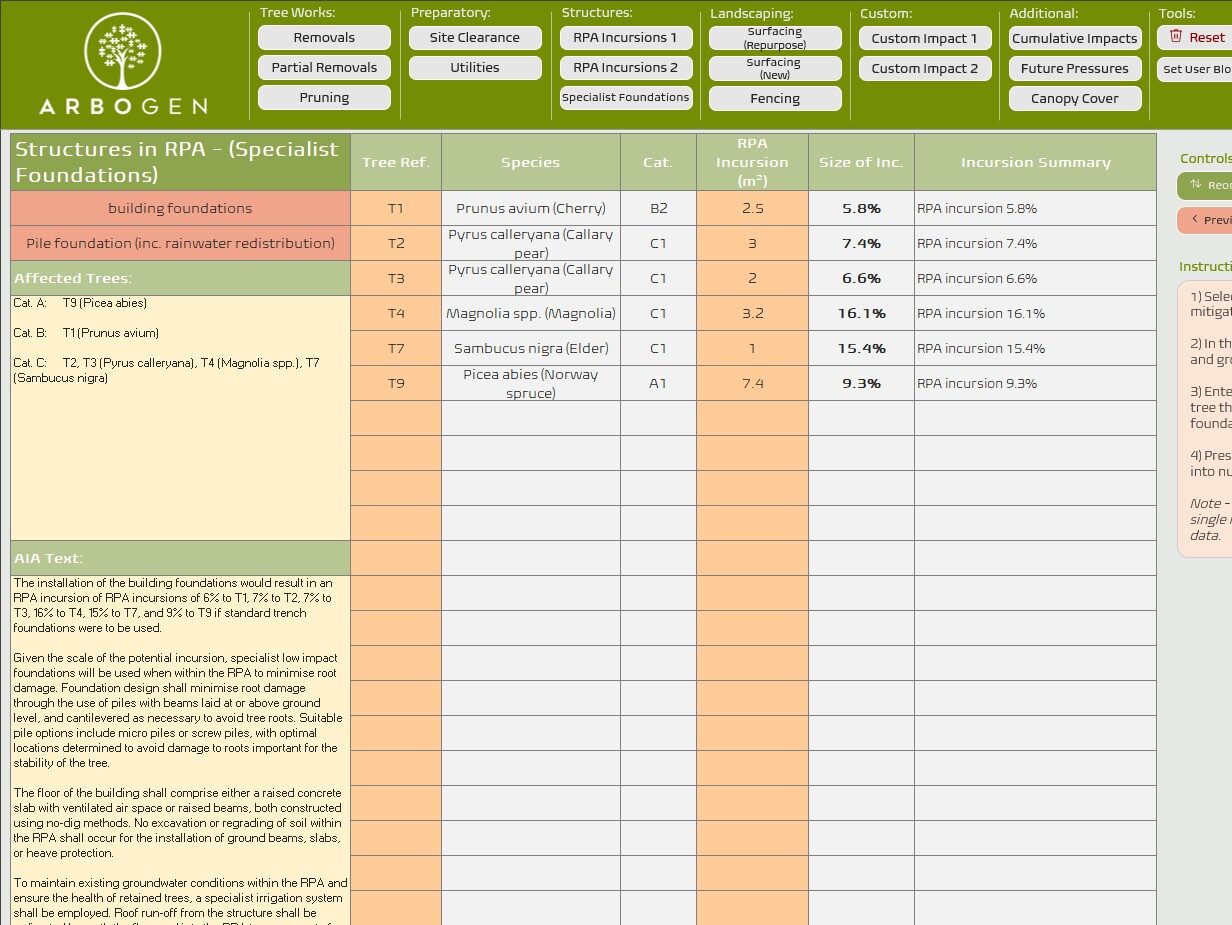
Canopy cover assessment — pre and post-development canopy cover calculated and summarised automatically. Use the Detailed CAD-based method or the Simple model from your survey data. What used to take hours now takes minutes.
Significance of impacts — for each recorded impact, select pre- and post-mitigation significance ratings using guided selectors, based on BS 5837:2026 guidance.
Tree survey schedule and works list — generated directly from your selections, fully editable, and exportable to Excel or PDF.
AMS Builder
Build a clear, practical AMS using ArboGen’s streamlined interface, with the requirements of your AIA already considered:
Pre-populated from your AIA — activities selected in your AIA carry through automatically, so you’re not re-entering work you’ve already done. Add further activities, remove any that aren’t needed, and the AMS stays in step with your impact assessment throughout.
Tree protection and mitigation library — choose from a wide range of pre-built tree protection measures and mitigation methodologies covering the full range of typical site scenarios. Each one comes with the standard wording and structure already in place, ready to adapt to your project.
Reorder with ease — add and reorder methodology sections using a simple interface. Your AMS reads in a logical sequence that matches how the works will actually proceed on site, without manual cutting and pasting.
Staging and phasing tables — build staging and phasing tables for the development quickly, setting out when each protection measure or activity applies across the build programme. Gives contractors and clients a clear, at-a-glance timeline alongside the narrative.
Supervision requirements — specify the supervision requirements for each methodology section using a simple dropdown. Consistent terminology throughout, with no need to remember or retype standard supervision wording.
Automatic supervision schedule — ArboGen builds your supervision schedule directly from the supervision requirements you’ve set, activity by activity. One less document to assemble by hand, and it’s always in sync with the rest of your AMS.
Customisation
We know that every consultant has their own take:
Your branding — set your firm’s fonts, brand colours, and sizing once in the settings tab, applied automatically to every project.
Works with your existing templates — ArboGen is designed to use your existing report templates, so every report goes out exactly as you want it.
Customisable QuickCodes — build a shorthand library to cut down on repetitive note-taking during surveys, for faster and more consistent data entry.
Custom phrasing — if you don’t like the wording in one of ArboGen’s text blocks, set up a replacement using the custom phrasing feature and it’s applied automatically on every export.
Custom dynamic AIA and AMS blocks — build your own reusable dynamic text blocks using the User Blocks tool, for activities and methodologies unique to your practice.
Outputs
Every consultant works differently. ArboGen’s customisation tools put you in control — set your branding, build your own shorthand, fine-tune report wording, and create your own custom AIA and AMS blocks, so the output is always unmistakably yours.
.xlsx
Survey schedule and data export to Excel..
.docx
TS, AIA, and AMS reports export directly into your own Word templates
Tree survey schedule exportable as a PDF.
Free Trial & Simple Pricing
One licence per user, with the choice of monthly or annual billing. No payment details are required until after free trial ends, and you can cancel at any time.
Sign up before October 2026 to lock in the Early Adopter rate for life. After that, standard pricing applies.
System requirements: Windows PC with Office 365 installed locally.

Early Adopter Plan
Limited time offer
£85 / £850
- 3 months free trial period
- Early Adopter 10% saving
- Lifetime price lock on continuing subscriptions
- Cancel anytime
- Ongoing support and updates
Monthly Plan: £85+VAT
Annual Plan: £850+VAT (save 17%)
Standard Plan
From Oct 2026
£95 / £950
- 1 month free trial period
- Cancel anytime
- Ongoing support and updates
Monthly Plan: £95+VAT
Annual Plan: £950+VAT